MacBook Pro 13-inch: Why Two Ports vs Four Ports Changes the Price
On the 13-inch MacBook Pro, the two- vs four-Thunderbolt-port split marks a real chip and memory tier that still moves resale value.
Encore Editorial · Sep 27, 2026 · 6 min read
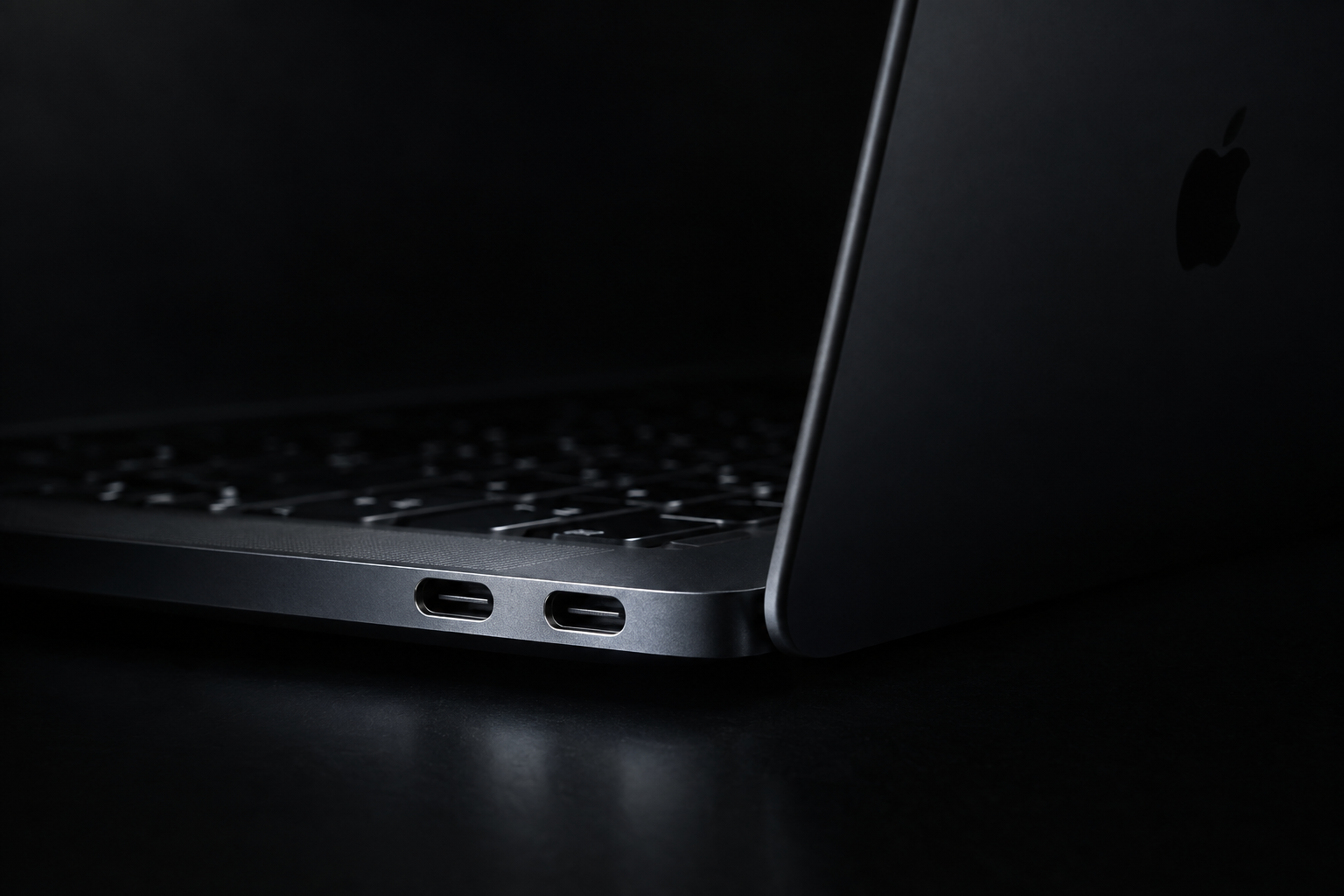
Count the ports. If you own a 13-inch MacBook Pro and you are trying to work out what it is worth, the fastest tell on the whole machine is how many Thunderbolt connectors sit on its sides. Two ports versus four ports was never a cosmetic choice — on the 13-inch MacBook Pro it marked a real split in chips, memory, and price, and that split still shapes what these machines fetch on the used market today. Learning to read it takes about ten seconds and tells you more than the year printed on the box.
Apple sold the 13-inch MacBook Pro in overlapping "two-port" and "four-port" versions for years. They looked nearly identical and shared a chassis, so buyers often assumed the extra ports were the only difference. They were not. The port count was Apple's shorthand for two different tiers of internals — and once you know what each tier contained, the price gap between otherwise-identical-looking laptops stops being a mystery.
Two ports vs four ports: what actually differed
The clearest example is the final Intel generation, the 13-inch MacBook Pro from 2020, which shipped in both flavors at once. The two-port model used an older 8th-generation "Coffee Lake" processor and topped out at 16GB of comparatively slow 2133MHz LPDDR3 memory. The four-port model, by contrast, ran a newer 10th-generation "Ice Lake" chip. As Apple's own technical specifications record, that four-port version shipped with "16GB of 3733MHz LPDDR4X onboard memory," configurable to 32GB — roughly double the ceiling and far faster memory than its two-port sibling.
The enthusiast site Low End Mac lays out the gap bluntly: the two-port ran "2133 MHz PC3-LPDDR3 SDRAM @34.1 GB/s," while the four-port used "3733 MHz PC4-LPDDR4x SDRAM @58.3 GB/s." It also notes the four-port machines "were the only Intel 'Books to have ever shipped with an Ice Lake CPU." Same silver shell, meaningfully different computer inside. The four-port also drove better external displays and offered more memory bandwidth for sustained work.
The short version: On the 13-inch MacBook Pro, port count is a proxy for the whole spec tier. Among Intel models, four ports means a faster chip, faster memory, and a higher RAM ceiling — and it holds more value than the two-port. But the newer chip matters even more than the port count.
The catch: two ports is not always the lesser machine
Here is where a lot of used listings get it wrong. Port count reliably ranks two Intel machines against each other, but it breaks down the moment Apple Silicon enters the picture. When Apple replaced the entry 13-inch Pro in late 2020, the new M1 model carried only two Thunderbolt / USB 4 ports, and its base memory started at 8GB, configurable to just 16GB, per Apple's M1 tech specs. On paper that reads like the "lesser" configuration.
In practice the M1 two-port outclasses every Intel 13-inch Pro ever made, four ports included. It is quieter, runs cooler, lasts far longer on battery, and — critically for resale — it is still a supported machine. So the honest rule is a two-step one: compare port count only within the same chip family, then let the chip win. A four-port Intel beats a two-port Intel. A two-port M1 beats them both.
Why this now decides value, not just spec-sheet bragging
The port question took on real financial weight in September 2026. macOS 27 "Golden Gate" dropped support for the last Intel Macs, and the four-port 13-inch MacBook Pro from 2020 was on the list of models left behind — alongside the 16-inch MacBook Pro (2019), the 27-inch iMac (2020), and the Mac Pro (2019). MacRumors notes those Intel machines "will continue to receive security updates for three years," but they no longer get new macOS features, and Rosetta translation is being wound down after Golden Gate.
That reshuffles the value order. For most of the last few years, a four-port Intel 13-inch held more than a two-port Intel because it was simply a better computer. That is still true head-to-head. But the entire Intel tier now sits under a support clock, while the two-port M1 — the "budget" port count — remains a current, supported machine that ages remarkably well. In resale terms, the newer chip has quietly become the thing buyers pay for, and port count is now most useful for telling two Intel units apart or confirming you are actually looking at Apple Silicon.
How to tell which one you own
You do not need to memorize model numbers. A few quick checks settle it:
- Count the Thunderbolt ports. Two on one side only, or two total, points to the entry tier (or the M1). Four — two per side — is the higher Intel tier.
- Open the Apple menu and choose About This Mac. It names the exact model and year, and whether the chip is Intel or Apple M1.
- Check the memory. A 32GB 13-inch Pro is necessarily a four-port Intel machine; the two-port and the M1 both capped lower.
- Look at the chip line. If it reads "Apple M1," you have the two-port Apple Silicon model — the most valuable 13-inch Pro of this era regardless of its modest port count.
What it means when you buy or sell
If you are buying used, do not treat two versus four ports as a simple better-worse switch. Confirm the chip first. Among Intel units, favor the four-port for its faster memory and higher ceiling — but understand you are buying into a machine on a support timeline. If you can stretch to the M1 two-port, that is the smarter long-term hold even though it has fewer ports and less headline memory.
If you are selling, the practical takeaway is that guessing hurts you. A four-port Intel and a two-port M1 are worth very different amounts for very different reasons, and listing a machine as merely "13-inch MacBook Pro 2020" hides which one you have. The cleanest way to skip the spec detective work is to pull the serial and let the model, chip, and memory resolve themselves — an instant offer takes about thirty seconds and reflects exactly which tier your machine sits in.
The bottom line
On the 13-inch MacBook Pro, two ports versus four ports is a genuine tier marker, not trim — four-port Intel models packed faster chips, faster memory, and more of it, and they hold more value than their two-port Intel siblings. But 2026 changed the frame: with Golden Gate retiring the Intel line, the two-port M1 has become the port count that actually keeps its worth. Count the ports to place a machine, then check the chip to price it.
Get an instant offer on your Mac
A real number in about 30 seconds — working or not. Free prepaid shipping, no seller fees, paid the day it arrives.*
Get my offerSources
More from Encore
 Value & Depreciation
Why MacBooks Hold Their Value Better Than Windows Laptops
Long software support, durable build, ecosystem pull, and steady demand keep used MacBooks worth far more than Windows laptops.
Sep 27, 2026 · 6 min read
 Value & Depreciation
Mac Studio vs Mac Pro: Which Holds Value Better?
Same silicon, very different depreciation: why the Mac Studio resells easily and the Mac Pro gives back more of its value.
Sep 27, 2026 · 6 min read
 Value & Depreciation
The iMac Pro: An Orphaned Powerhouse's Second Life
Discontinued, now Intel-sunset, still capable: who the iMac Pro is for in 2026 and how to value one.
Sep 27, 2026 · 6 min read