How to Ship an iMac Without Breaking It
The hardest Mac to ship is a sheet of glass on a stand. Protect the screen corners, immobilize the stand, and double-box it so a drop never reaches the panel.
Encore Editorial · Nov 13, 2026 · 5 min read
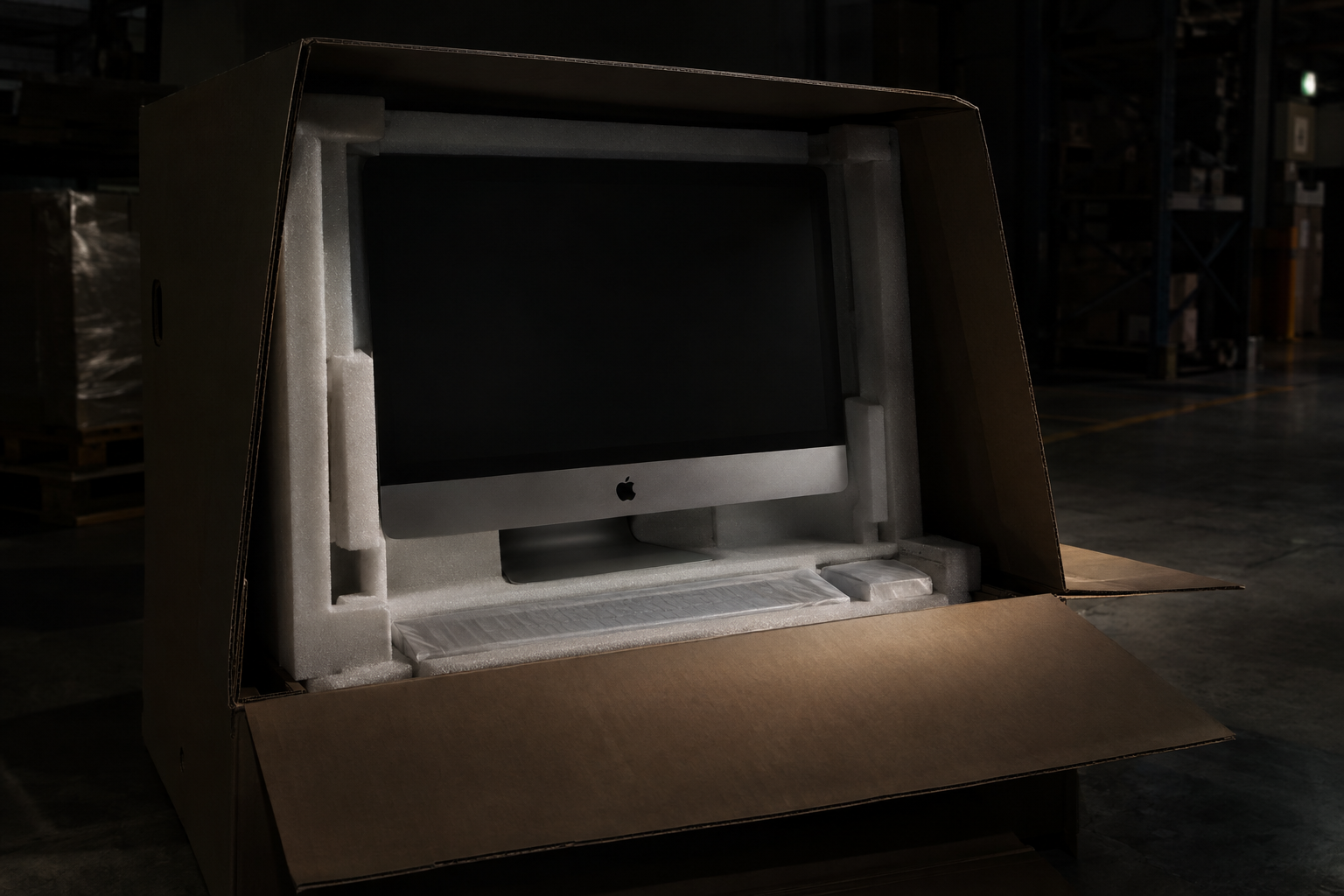
An iMac is the hardest Mac to ship, and it isn't close. A MacBook is a small, rigid slab you can wrap and double-box on a kitchen table. An iMac is a wide sheet of glass bonded to a thin aluminum chassis, balanced on a stand, with a center of gravity that wants to tip — and it is heavy enough that a drop lands hard. Learning how to ship an iMac without breaking it is mostly about respecting that geometry: protect the screen, immobilize the stand, and put enough box around it that an impact never reaches the glass. Get it wrong and the machine arrives with a cracked panel, which is the single most expensive thing that can happen to it.
Here is how to pack an iMac so it survives the trip.
The original box is the gold standard — use it if you have it
Apple's iMac packaging is engineered for exactly this job: molded inserts that cradle the display and suspend it so it never rests directly on a box wall. In an Apple Support discussion on shipping an iMac in its original box, experienced users agree that "the original box is the ideal box to use" — one reported shipping a 21.5-inch iMac in its factory packaging with "no complaints about its condition." The one caveat they add is important: even with the original box, "it would not hurt to double box it with some peanuts, foam or bubble wrap." The factory box protects the machine; a second box protects the factory box.
If you kept the box but lost the foam, don't ship it anyway — bare cardboard with the iMac rattling inside is worse than no box at all. Source replacement foam or pack it from scratch as below.
No original box? Build the protection yourself
Packing an iMac without its box is doable, but every step matters more. The method the major carriers recommend for computers scales up to an iMac:
- Wrap the whole unit in multiple layers of bubble wrap, with extra padding doubled over the corners and across the face of the screen. The corners of the display are the most fragile points on the machine.
- Immobilize the stand. A foot or hinge that can swing becomes a lever that pries at the chassis during a drop. Wrap it so it can't move relative to the body, or detach it if your model allows and pack it alongside.
- Seat it in a snug inner box so it can't slide, then place that inside a larger outer box.
FedEx's guidance on shipping computers is specific about the double-box: use an outer box "at least 6″ larger in length, width, and height" than the inner box, line the bottom with "3″ of packing material," and surround the inner box with "at least 2″ of peanuts on all six sides." It also warns that the computer should be packed "snugly with filler so that the computer or laptop doesn't shift," but not so tightly that the packing presses on the machine. The electronics shipping guide at Easyship frames the same target as at least two inches of cushioning on every side and advises you to "always double-box" — then shake the sealed parcel and add filler if anything moves.
Two boxes, the screen never touching a wall. The whole strategy for an iMac is a snug inner box the machine can't rattle in, a sturdy outer box with at least two inches of cushioning on every side, and extra protection doubled over the screen corners and the stand. If the glass can't feel the box, a drop can't crack it.
Use the right outer box
An iMac's weight will crush a flimsy carton. The shipping-insurance guide at Secursus recommends "a larger, reinforced corrugated box" that can take impacts without collapsing onto the inner box — double-walled corrugate is the right call for something this heavy. Seal every seam with wide, strong tape so nothing can work open, and make sure nothing protrudes that could snag on a conveyor belt.
Orient it, label it, and don't advertise the contents
Mark the box "Fragile" and "This Side Up," and pack the iMac standing in its natural orientation — the same way the factory box ships, screen upright rather than lying flat. Be realistic about labels, though: as FedEx notes, "This End Up" markings "don't guarantee the box stays upright in transit," so your padding, not the arrow, is what has to save the machine. One more quiet tip from Secursus: keep the packaging plain and unmarked, since "plain, unmarked packaging reduces the risk of theft." Don't write "iMac" on the side.
Insure it and track it
An iMac is worth far more than default carrier liability covers — Secursus notes standard liability "caps at" a nominal amount that doesn't come close to a Mac's value — so declare the full value and add insurance for the replacement cost. Ship it tracked so you can prove it moved and arrived, which also protects you in any dispute. If you want the broader principles that apply to any Mac, our guide to shipping a MacBook so it arrives in one piece covers the fundamentals that carry over.
When the hard part is handled for you
All of the above assumes you are sourcing boxes and buying a label yourself — which, for an object this awkward, is real work. If you are selling the iMac, that burden can largely disappear. Sell to a buyer that provides shipping and you get a prepaid, insured label specced for the machine, so your job narrows to the packing itself. You can get an instant offer on your iMac in about thirty seconds, label included, and because broken and cracked-screen units are bought too, even an iMac that didn't survive a previous move still has a path. Pack it like the glass panel it is, and it arrives exactly as it left.
Get an instant offer on your Mac
A real number in about 30 seconds — working or not. Free prepaid shipping, no seller fees, paid the day it arrives.*
Get my offerSources
More from Encore
 Guides & How-To
How to Prove Your Mac Isn't Stolen to a Cautious Buyer
Nervous buyers want proof a used Mac is really yours to sell. Here's the paperwork and the two-minute checks that put their mind at ease.
Nov 18, 2026 · 4 min read
 Guides & How-To
Forgot Your Mac's Password Before Selling? Here's What to Do
Locked out of a Mac you want to sell? Here are the recovery routes in order — and the Find My step you still must not skip, even after a full erase.
Nov 17, 2026 · 4 min read
 Guides & How-To
How to Check Your Mac's Parts and Service History
Apple silicon Macs now keep a record of repairs. Here's how to read the Parts & Service screen, what the labels mean, and why it matters at resale.
Nov 16, 2026 · 4 min read