Staingate: When a MacBook's Screen Coating Peels Off
The anti-reflective coating that flakes off older Retina MacBook displays in stain-like patches — what causes it, Apple's quietly-run repair program, and how it affects a sale.
Encore Editorial · Sep 12, 2026 · 6 min read
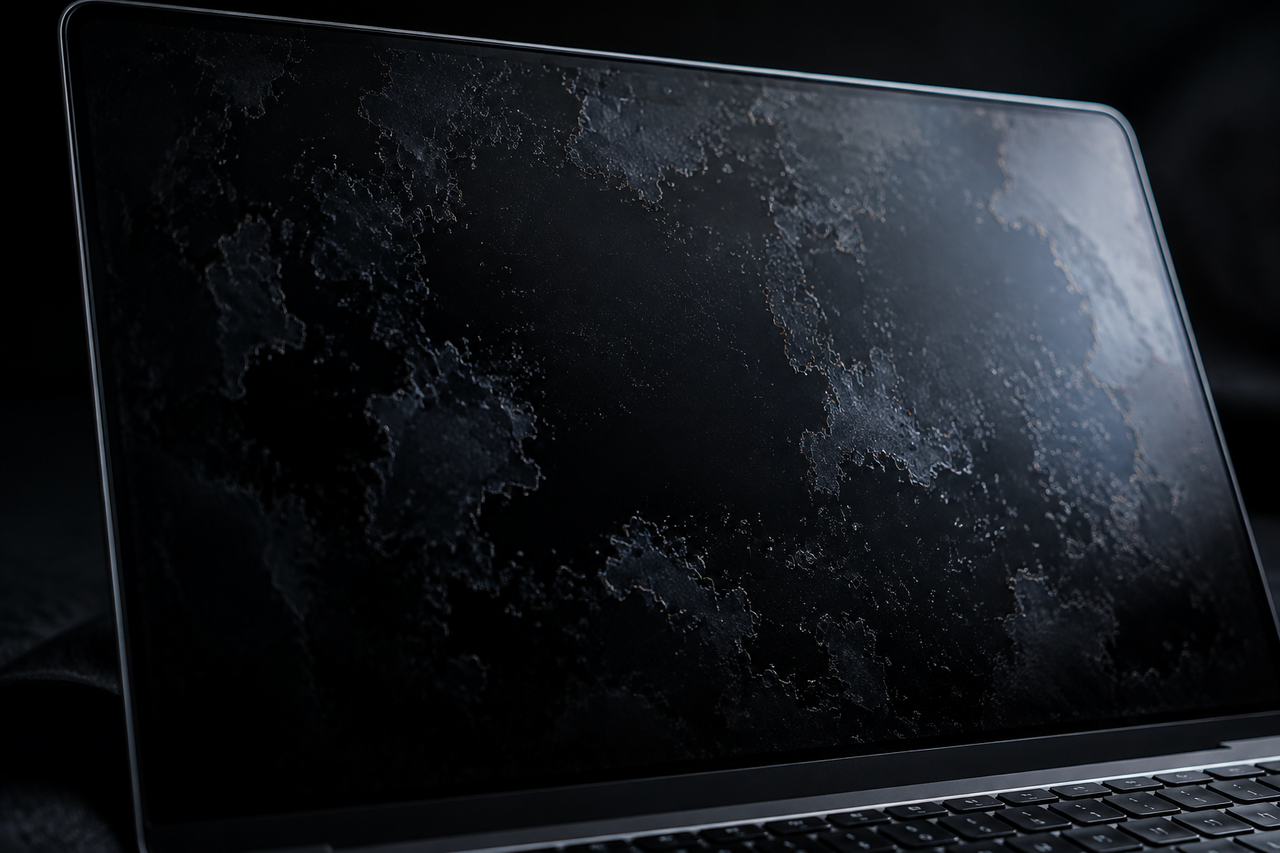
Some MacBook screen problems announce themselves loudly. Staingate is the quiet kind. You start noticing faint smudge-like patches on the display — often around the center, near the edges, or wherever your fingers and the keyboard tend to touch the glass when the lid is closed. You wipe them, and they don't come off, because they aren't dirt. They're places where the anti-reflective coating bonded to the glass has begun to wear away. Once you know what you're looking at, you see it everywhere, and it doesn't reverse on its own.
What Staingate is and why it happens
Retina MacBook displays carry a thin anti-reflective coating layered onto the glass to cut glare and deepen contrast. On a range of Retina models from roughly 2012 through 2017, that coating could delaminate — lift and flake away — leaving translucent, stain-shaped blotches that owners nicknamed "Staingate." The triggers are ordinary: skin oils, cleaning with the wrong products, and the simple pressure of the keyboard against the screen when the laptop is shut. iFixit's walkthrough on how to fix 'Staingate' on Apple MacBook displays describes the do-it-yourself route of carefully removing the remaining coating from the glass — which eliminates the patchy look but leaves you with a glossier, more reflective screen than Apple intended, since the anti-glare layer is simply gone.
That trade-off is the crux of Staingate: the cosmetic damage is fixable, but the "fix" either means a professional display replacement or accepting a screen without its original coating. Neither restores the panel to factory condition for free.
Staingate is coating wear, not a stain you can clean. The blotches are the anti-reflective layer delaminating from the glass, most common on 2012–2017 Retina MacBooks. It's purely cosmetic and doesn't affect how the machine runs — but it's permanent short of a professional display swap or stripping the coating entirely.
Apple's repair program — real, but time-limited
Apple never held a splashy press event about Staingate, but it did run a repair program for affected displays, replacing eligible screens at no charge within a coverage window measured from the machine's original purchase. The program was low-key enough that many owners never knew it existed. Crucially, it kept operating longer than people assumed: MacRumors reported that the MacBook Pro anti-reflective coating repair program remained in effect well after the initial rollout, and 9to5Mac confirmed into 2021 that Apple was still repairing eligible MacBooks for the anti-reflective coating issue.
The operative word, though, is "eligible." Coverage was tied to a set period after purchase, and for the 2012–2017 machines most affected, those windows have generally lapsed by now. So while the program is part of the story — and worth checking on an individual serial before assuming anything — most owners discovering Staingate today are past the free-repair window and looking at out-of-pocket options.
Your realistic options if you have it
- Verify eligibility first. If a machine is still within any applicable coverage window, an authorized repair is the ideal outcome.
- Professional display replacement. Restores the anti-reflective screen, but it's a significant repair relative to an older machine's value.
- Strip the coating. The DIY iFixit approach removes the blotches at the cost of a glossier, more reflective display.
- Live with it. Since it's cosmetic, plenty of owners simply keep using the machine as-is.
How Staingate affects a sale
Because Staingate is visible and instantly recognizable to any informed buyer, it directly shapes resale value even though the computer works perfectly. A private buyer who knows the term will read a patchy display as either a coming repair bill or a screen they'll have to strip, and price accordingly. Try to photograph around it or sell it as "like new," and you invite exactly the kind of post-sale dispute that peer-to-peer selling is prone to — a buyer opening the box, spotting the blotches, and demanding a refund.
The honest approach protects you: describe the coating condition plainly, note whether you've had it repaired or stripped, and let the price reflect it. A Staingate MacBook is a fully functional computer with a cosmetic display flaw — not a broken machine — and there's an active market for exactly that, especially given how well older Retina MacBooks still hold up for everyday work.
If you'd rather not manage the disclosure dance, the eligibility research, or a buyer who might turn a known cosmetic issue into a chargeback, selling to a buyer that already prices coating wear into the number is simpler. Encore gives you an instant online offer in about 30 seconds, a free prepaid, insured label, and payment once the Mac arrives — the offer you accept is the offer you're paid, with no stranger to meet and no chargeback exposure if a buyer later notices the blotches. It buys cosmetically damaged and broken units too, so Staingate is just a factor in the quote rather than a dealbreaker. It won't always beat a flawless private sale on headline price, but for a screen with peeling coating, it removes the friction. You can see what your MacBook is worth as-is, patches and all.
Get an instant offer on your Mac
A real number in about 30 seconds — working or not. Free prepaid shipping, no seller fees, paid the day it arrives.*
Get my offerSources
More from Encore
 Repairs & Reliability
The Spinning-Disk iMac: Upgrade It or Sell It?
An SSD can transform a slow hard-drive iMac, but the glued display makes it tricky. Here's when to upgrade and when to just sell.
Sep 27, 2026 · 6 min read
 Repairs & Reliability
Liquid Damage Doesn't Always Total a Mac
A spill's real enemy is corrosion, not water. Why many liquid-damaged Macs are repairable — and still hold value if they aren't.
Sep 25, 2026 · 6 min read
 Repairs & Reliability
Flexgate and Staingate: Old Display Defects That Still Hit Resale
What Flexgate and Staingate are, which MacBook Pros they hit, and how each one moves used value years after Apple's repair programs ended.
Sep 25, 2026 · 6 min read