Selling a MacBook With a Swollen or Dead Battery
A swollen MacBook battery is a safety issue first and a resale question second — here's how to handle it, what a repair costs, and its as-is value.
Encore Editorial · Sep 7, 2026 · 6 min read
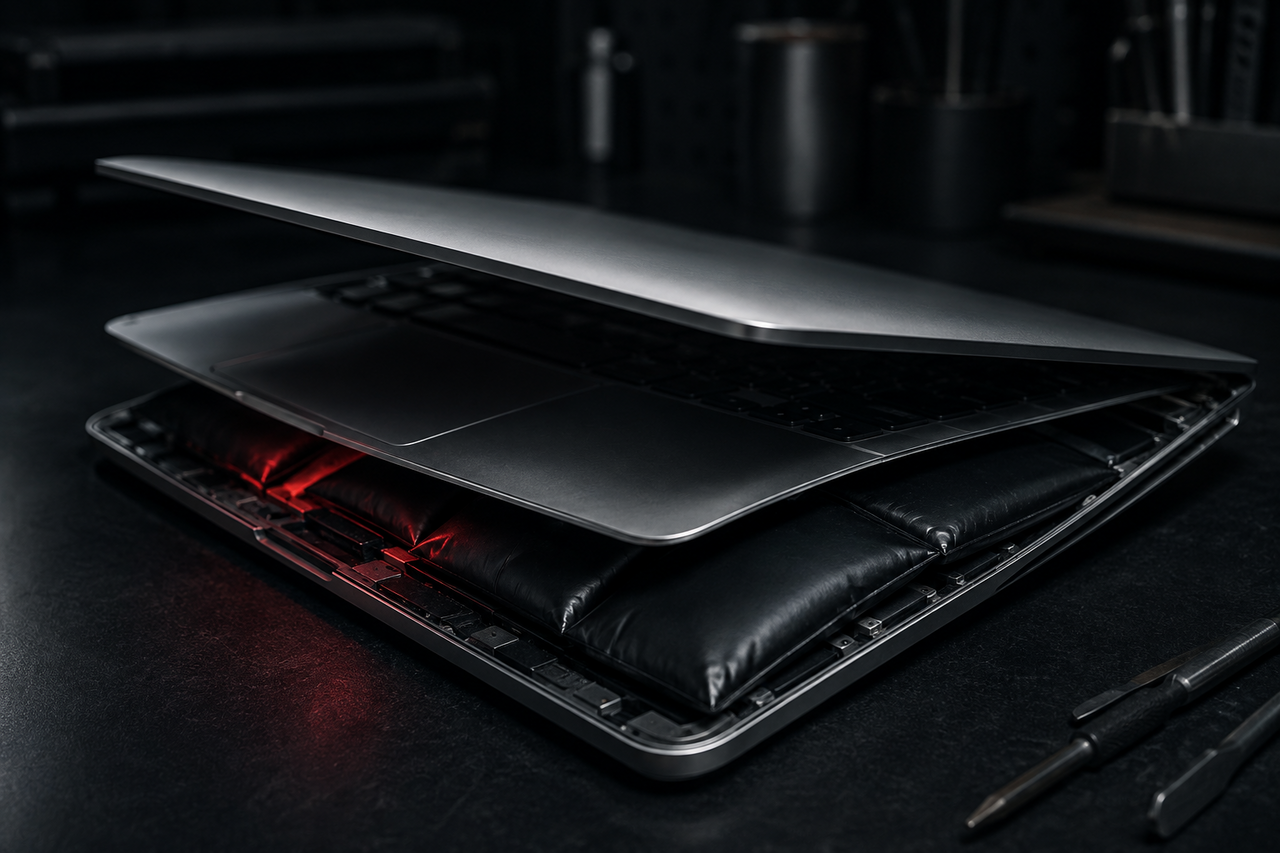
A trackpad that no longer clicks flat, a case that rocks on the desk, or a bottom panel that has quietly bowed outward are the classic signs of a swollen battery — and if that describes your MacBook, the first thing to understand is that it is a safety issue before it is a resale question. Selling a MacBook with a swollen or dead battery is entirely possible, but only if you handle the machine correctly first. This guide covers what a swollen battery actually is, why you should stop using it, what a repair costs, and what an as-is unit is realistically worth.
What "swollen" means, and why it happens
Every lithium-ion battery gives off a small amount of gas as it ages. Normally that is harmless. But when a cell's internal management circuitry stops regulating properly, the battery can over-charge and over-discharge, producing gas faster than it can dissipate — and the pouch inflates like a pillow. Battery expert K.M. Abraham explained the mechanism to Consumer Reports, noting that if "the battery's management circuitry stops working properly," the cell can "over-discharge and over-charge, producing gas."
In a MacBook the battery sits directly under the trackpad and keyboard, so a swelling cell physically pushes those parts up. A trackpad that won't click, a lid that no longer sits flush, or a visible gap opening along the seam are all telltale signs.
Safety first: stop using it
A swollen battery is a genuine hazard, and iFixit's guide to what to do with one is blunt about it: "If you suspect your battery is swollen, don't charge your device. Run the battery down as low as you can — this reduces the risk of fire." Never puncture, press, or try to flatten it — "puncturing the battery can lead to dangerous fires." The Consumer Reports coverage adds practical advice from Abraham to unplug an affected laptop immediately and keep it away from anything flammable.
Do this now: unplug the machine, stop charging it, power it down, and set it somewhere cool and away from flammable material. Do not press on the bulge, and do not try to remove the battery yourself unless you have the tools and confidence to do it safely — iFixit recommends consulting a professional if you have any doubt.
Repair costs: often more than the part
Here is the catch that surprises most owners. On Apple's Retina-era MacBooks, the battery is glued into the top case rather than screwed in, and once it swells, Apple typically treats the assembly as a damaged top case rather than a simple battery job. That pushes the repair well past a standard battery-service price.
For reference, iFixit's MacBook battery replacement guide notes that Apple's out-of-warranty battery service for a MacBook Pro costs appreciably more than iFixit's own do-it-yourself fix kits — but that assumes a normal battery. Once a cell has swollen and the case is affected, the bill climbs, and on older machines the glued-down cells "require a lot of caution and patience" to remove safely. For a MacBook that is several years old, a top-case-level repair can easily approach or exceed what the machine is worth.
The shipping wrinkle you need to know
A swollen or physically damaged lithium battery is not a normal parcel. iFixit warns that you should "never ship a battery without specific authorization and instructions as there are safety protocols that must be followed according to law." Damaged lithium cells are restricted dangerous goods, so a swollen unit cannot simply be dropped in any box and mailed like a healthy laptop. This matters when you sell: a reputable buyer will either provide compliant packaging and instructions or advise you on safe handling. If a swelling is severe or the battery is leaking, local e-waste and battery-disposal facilities are the safest immediate option.
What an as-is MacBook is actually worth
A swollen or dead battery lowers the value of a MacBook, but it does not zero it out — and sellers consistently underestimate the residual worth. The battery is one component. The display, logic board, SSD, RAM, chassis, and ports are all still there, and on Apple Silicon and recent Intel machines those parts hold real value. A buyer who can safely replace the battery and top case is pricing that repair in, not writing the whole machine off.
A few things that move the number:
- Model and age. A recent MacBook Air or Pro with a swollen battery is worth far more as a repairable machine than a decade-old model, where the repair cost overtakes the value.
- Whether it still powers on. A machine that boots (even briefly, on adapter power) is easier to verify and worth more than a truly dead unit — but never force-charge a swollen battery just to demonstrate this.
- Honest disclosure. "Battery is swollen, trackpad no longer clicks" is exactly the information a buyer needs to quote fairly. Vague listings invite lowball offers; precise ones don't.
If the repair quote comes back higher than the machine's working value — which is common on older Retina MacBooks — selling as-is is usually the better financial move than paying for a top-case replacement you will never recoup. Encore buys MacBooks in exactly this condition, including units with swollen or dead batteries, so it is worth getting a number before you assume the machine is only good for recycling.
Bottom line: handle the battery safely, skip the expensive repair on an older machine, and see what the MacBook is worth as-is — a swollen battery is a discount, not a death sentence.
The bottom line
A swollen MacBook battery is first a safety matter: stop charging it, stop using it, and don't try to flatten or puncture it. Once the machine is stable, the economics are usually straightforward. Because a swollen cell often turns into a top-case repair that can rival the machine's value, and because damaged batteries carry real shipping restrictions, many owners come out ahead selling the unit as-is to a buyer equipped to handle it — rather than pouring a repair bill into a laptop on its way out.
Get an instant offer on your Mac
A real number in about 30 seconds — working or not. Free prepaid shipping, no seller fees, paid the day it arrives.*
Get my offerSources
More from Encore
 Repairs & Reliability
The Spinning-Disk iMac: Upgrade It or Sell It?
An SSD can transform a slow hard-drive iMac, but the glued display makes it tricky. Here's when to upgrade and when to just sell.
Sep 27, 2026 · 6 min read
 Repairs & Reliability
Liquid Damage Doesn't Always Total a Mac
A spill's real enemy is corrosion, not water. Why many liquid-damaged Macs are repairable — and still hold value if they aren't.
Sep 25, 2026 · 6 min read
 Repairs & Reliability
Flexgate and Staingate: Old Display Defects That Still Hit Resale
What Flexgate and Staingate are, which MacBook Pros they hit, and how each one moves used value years after Apple's repair programs ended.
Sep 25, 2026 · 6 min read